Determining The MTU To A Single Server
This summary is not available. Please click here to view the post.

Share This Post!
 Del.icio.us
 Digg
Digg
 Facebook
 StumbleUpon
 Technorati
 Twitter
This summary is not available. Please click here to view the post.
Share This Post!
Del.icio.us
Digg
Facebook
StumbleUpon
Technorati
Twitter
The Services are the various low-level system processes, that all programs and applications depend upon. Services run independently of who is logged in to a computer; most services start when the computer is started, not after login.
While there are many services provided with the Operating System, all services are not essential on any given computer, and may not be running at any given time.
The essential services must be running, yet other services may have to be NOT running, on your computer. You must make the decision, based upon how your computer is to be used. You set each service in question appropriately.
You can start, stop, change startup status, and / or query the status of a service interactively (using the Services wizard), or from a command window (using the Services Controller CLI). You can use Process Explorer, to find out many details about any service, since (as I wrote above) services are the low level processes running on your computer.
The Services Wizard
You start the Services wizard from Control Panel - Administrative Tools - Services.
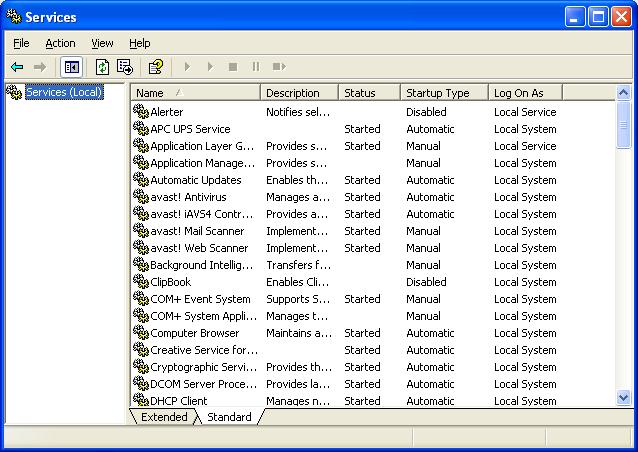
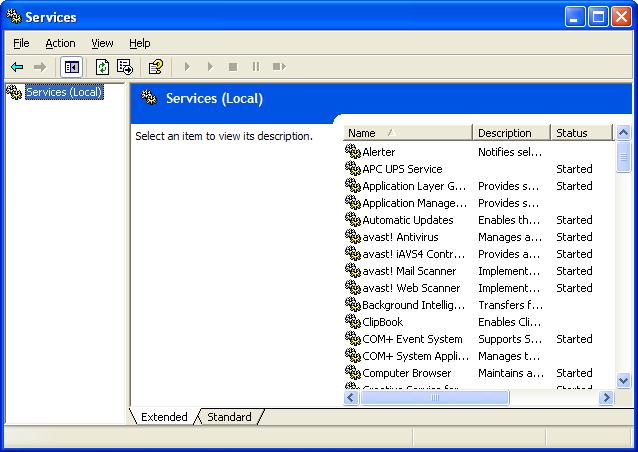
You may use the Services wizard presented in Standard, or Extended, mode. The choice is yours.
Find the service that concerns you, and double click on it (or right click, and select "Properties").
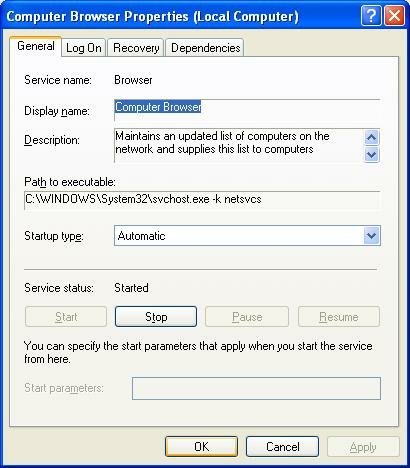
The Service name and Display name are two descriptors which are used, alternately, in various places. You should be aware of both values.
You may find Path to executable useful when you are researching an instance of "svchost.exe", using Process Explorer.
Startup type determines when, or if, it will ever be started.
Service status determines whether it is, or should be, running now.
 Dependencies shows other services that this service requires to be running, and other services that require this service to be running, before they themselves will start.
sc query browser
sc stop browser
sc start browser
sc config browser start= disable
sc config browser start= auto
Share This Post!
Del.icio.us
Digg
Facebook
StumbleUpon
Technorati
Twitter
Stable and secure Windows Networking depends upon properly designed, routed, subnets. IP routing was designed to make Local Area Networks connect, yet still observe geographical relationships. Using routers between LANs allows localisation of some domain services (browsing, name resolution), but wide spread availability of others.
When you route IP connectivity thru wiring that you own and control, that's behind a firewall, each connected LAN is as safe as any of the other LANs. Threats on the outside (Internet) stay on the outside. Two geographically separate LANs, connected by a dedicated, leased communication line, are as safe as each other is safe.
What if you have 2 LANs, distant from each other, and can't justify the expense (initial or ongoing) of a leased or owned communication line? If both LANs have Internet access, you can still connect them; just use the Internet as the WAN link.
But wait! I hope you know how dangerous the Internet can be. It's bad enough when accessing it as clients. Plain old web browsing is bad enough, how about running a server on the Internet? OK, how about running all of the computers on your LANs thru the Internet? Why not hold up a $100 bill, and stroll thru Times Square in New York City? See if you get anywhere alive.
But you can connect your LANs thru the Internet, if you design the connection properly. A controlled, encrypted tunnel between your LANs, using routers that support a Virtual Private Network (aka VPN) will do this fine.
A VPN will be a lot easier to setup, and more stable and secure, when properly planned.
Share This Post!
Del.icio.us
Digg
Facebook
StumbleUpon
Technorati
Twitter
If you have Windows XP, and you just ran the Network Setup Wizard, your computer most likely uses NetBIOS Over TCP/IP (NetBT). If all of your computers use this same language, and were all setup properly, the chances are good that you will be able to share files with them.
There are other languages that your computers might speak.
Share This Post!
Del.icio.us
Digg
Facebook
StumbleUpon
Technorati
Twitter
If you have a portable computer, and you've setup a WiFi LAN in your house or office, you'll enjoy the freedom of moving around the house, at will, while still connected to the LAN. Even so, sometimes there will be times when the WiFi connection isn't enough. You'll never get rid of Ethernet, completely.
Most portable computers come with an Ethernet adapter, and a WiFi adapter, installed and activated. The Automatic Metric feature in Windows XP let you leave both connections activated, and will use the fastest connection, that is working, at any time.
You can use automatic metrics (by default), or you can manually change the settings to prefer either connection, using the TCP/IP Properties - Advanced wizard.
NOTE: Using the Automatic Metric feature on a laptop having a role as a server on your LAN may cause problems with the browser infrastructure. Don't carry a server around without understanding the complications.
>> Top
Share This Post!
Del.icio.us
Digg
Facebook
StumbleUpon
Technorati
Twitter
The classical personal firewalls, which would be installed on most personal computers in a typical Small Office / Home Office environment, block only specific network traffic. By default, they are open, and pass all traffic.
Modern firewalls, used by more cautious network experts, permit only specific network traffic. By default, they are closed, and pass no traffic. After installing this type of firewall, you must run a manager and configure the firewall to pass your desired traffic.
My suspicion is that the nVidia nForce hardware firewall falls in the latter category. If you don't run the firewall manager, it will pass only a minimum of traffic, probably just enough for you to surf to the nVidia website and get software upgrades. This intentionally blocks SMBs (whether NetBT hosted, or directly hosted), and protects against the dangers offered by Windows Networking. If you're going to use Windows Networking over TCP/IP, you must run the firewall manager, and intentionally configure it for Windows Networking.
Short of configuring the firewall for Windows Networking over TCP/IP, you have no choice but to install an alternate transport such as IPX/SPX or NetBEUI, which bypasses the firewall completely.
For ongoing discussion about this issue, see these threads in the Microsoft Public WindowsXP Network_Web forum:
If you have the NVIDIA nforce networking controller with onboard LAN, you may have a "hidden firewall" interfering with your network connection. I'll describe my own situation and how I resolved the problem. I owe great gratitude to Chuck, frequent poster in this group, who worked with me for about a week, and had suggested the possibility of the NVIDIA "hidden firewall", but I was reluctant to accept that because, well, it really was hidden and I couldn't find it (and still can't). But it was there. (For those who want to review the original thread, it was posted in this group under the title "networking only works one way" on 08/04/06.)
Share This Post!
Del.icio.us
Digg
Facebook
StumbleUpon
Technorati
Twitter
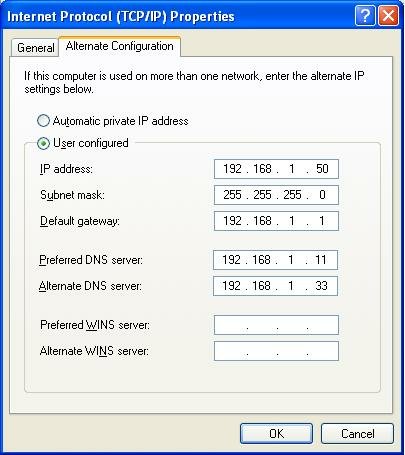
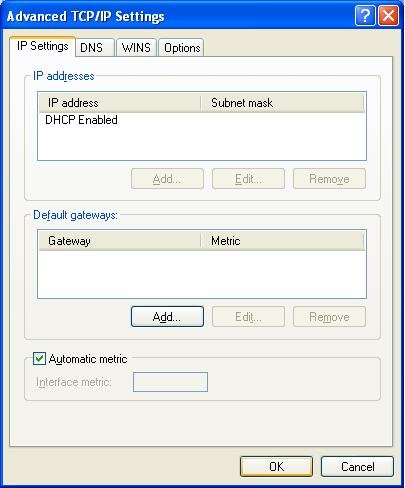
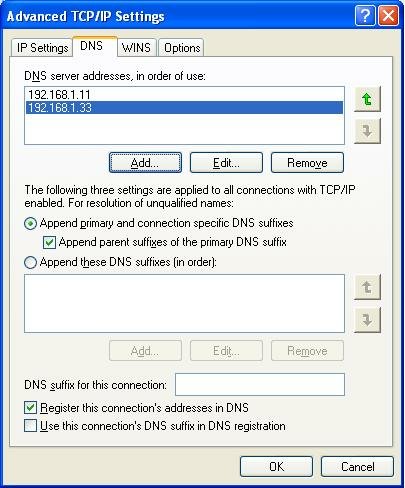
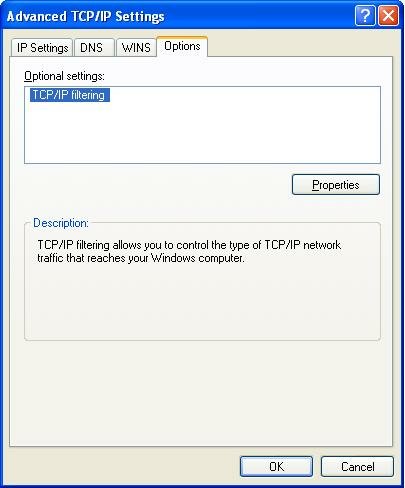
The Windows Network Setup Wizard, provided on computers running Windows XP, is a convenient way to setup your network. Sometimes though, you need to setup things manually.
In cases where you can't use the Network Setup Wizard, you'll be using the Network Connection Wizard.



Share This Post!
Del.icio.us
Digg
Facebook
StumbleUpon
Technorati
Twitter
Setting up a WiFi LAN is a great experience. The convenience of surfing the web from your back yard, or sharing files between your main computer and your music server, without running wires here and there, is exhilarating. But there is stress involved.
When you connect a computer to a WiFi LAN, with WPA (and WPA-PSK is absolutely the minimum security measure that you should - no must - take), you are testing a number of things, simultaneously.
1DBE12287EC82B22233C74B356BAC5E4EDC1447168B5F5A9C985C154220E0568
Hb+r#^S-T/1!JTP0_~SB 4&rQ7|s"q)7S`teMB`]x_uGATQQ-{B:=%W/_")$w6h
0btNigYpFmG5MGDBahRnw203t6jQlCYCNcuvCYgGAZVCFSLSwp7deBMj9Iy7Vfr
Share This Post!
Del.icio.us
Digg
Facebook
StumbleUpon
Technorati
Twitter
Windows Networking is the subsystem that lets you share files and printers, between computers running the various versions of Windows. Server Message Blocks, also called SMBs, are the foundation of Windows Networking. SMBs provide several crucial functions.
netbios-ns 137/tcp NETBIOS Name Service
netbios-ns 137/udp NETBIOS Name Service
netbios-dgm 138/tcp NETBIOS Datagram Service
netbios-dgm 138/udp NETBIOS Datagram Service
netbios-ssn 139/tcp NETBIOS Session Service
netbios-ssn 139/udp NETBIOS Session Service
microsoft-ds 445/tcp Microsoft-DS
microsoft-ds 445/udp Microsoft-DS
The account is not authorized to log in from this station.
Share This Post!
Del.icio.us
Digg
Facebook
StumbleUpon
Technorati
Twitter
Microsoft Windows, in its default state, uses TCP/IP, and NetBIOS Over TCP/IP, for networking. Sometimes, we forget this detail. NetBT is so easily overlooked, yet it is essential.
If we are looking at the output from "ipconfig /all", and we see
        IP Address. . . . . . . . . . . . : 192.168.1.50
        Subnet Mask . . . . . . . . . . . : 255.255.255.0
        Default Gateway . . . . . . . . . : 192.168.1.1
        DHCP Server . . . . . . . . . . . : 192.168.1.1
        DNS Servers . . . . . . . . . . . : 192.168.1.11
                                            192.168.1.33
        NetBIOS over Tcpip. . . . . . . . : Disabled
        Lease Obtained. . . . . . . . . . : Wednesday, April 16, 2003 11:19:12
        Lease Expires . . . . . . . . . . : Wednesday, April 23, 2003 11:19:12
        IP Address. . . . . . . . . . . . : 192.168.1.50
        Subnet Mask . . . . . . . . . . . : 255.255.255.0
        Default Gateway . . . . . . . . . : 192.168.1.1
        DHCP Server . . . . . . . . . . . : 192.168.1.1
        DNS Servers . . . . . . . . . . . : 192.168.1.11
                                            192.168.1.33
        Lease Obtained. . . . . . . . . . : Wednesday, April 16, 2003 11:19:12
        Lease Expires . . . . . . . . . . : Wednesday, April 23, 2003 11:19:12
Use NetBIOS setting from the DHCP server.
after Enabling NetBT, check the TCP/IP NetBIOS Helper service.
NetBIOS over Tcpip. . . . . . . . : Disabled
Share This Post!
Del.icio.us
Digg
Facebook
StumbleUpon
Technorati
Twitter
Domain Name Services, or DNS, is a critical service on almost all Local and Wide Area Networks. DNS is used for host name to IP address resolution of all Internet hosts, many WAN hosts, and may be used for address resolution of LAN hosts too. DNS resolution is so important that Windows supports configuration of 2 DNS servers in basic IP configuration; with more work, you can define even 3 or more DNS servers. Many NAT routers will let you define up to 3 DNS servers.
Any time you try to access a server on the Internet, and get "server not found" or "unknown host", check your DNS server settings. Run "ipconfig /all", and look for the DNS servers entry, such as:
        DNS Servers . . . . . . . . . . . : 192.168.1.11
                                            192.168.1.33
Share This Post!
Del.icio.us
Digg
Facebook
StumbleUpon
Technorati
Twitter
The nVidia corporation, probably best known for their industry leading video cards like the GeForce, is now marketing a hardware based personal firewall. The nForce comes in two forms - an Ethernet adapter PCI card, and a motherboard with an embedded Ethernet adapter.
The nForce is an ICSA certified firewall, with full firewall functionality, that sits inside your computer.
If you're having a Windows Networking, or file sharing, problem, and you have an nForce component in your computer, you need to know this. During January and February 2006, I assisted in diagnosing several network issues that involved the nForce. In at least one case, the person with the computer had no idea what he had purchased, and innocently installed.
Run an "ipconfig /all" on your computer. If you see something like
Windows IP Configuration

Host Name . . . . . . . . . . . . : PChuck1
Primary Dns Suffix  . . . . . . . :
Node Type . . . . . . . . . . . . : Unknown
IP Routing Enabled. . . . . . . . : No
WINS Proxy Enabled. . . . . . . . : No

Ethernet adapter Local Area Connection:

Connection-specific DNS Suffix . :
Description . . . . . . . . . . . : NVIDIA nforce Networking Controller
>>>>>Good Morning, Chuck. And for the twentieth time, I appeciate your
>>>>>tenacity and effort in trying to help me solve this frustrating
>>>>>problem.
>>>>>Update:
>>>>>I think I followed your suggestions properly. Here's what I did:
>>>>>1. Established a new account on all three (ASUS-AMD is back up!)
>>>>>computers. They are adminstrative accounts with identical passwords.
>>>>>2. Simple file sharing disabled on all three.
>>>>>3. Created a test folder on AMD64, with full permissions for everyone
>>>>>under "sharing" tab, and with "read" permissions for each user and
>>>>>group under the "security" tab. (Some were greyed out).
>>>>>4. Activated this user name on each computer with "net user name
>>>>>/active:yes"
>>>>>5. Checked TCP/IP for correct settings and did "repair" to flush.
>>>>>6. Put remote registry service on automatic. There are very few
>>>>>services now disabled (alerter, messenger, clip book)
>>>>>6. Rebooted.
>>>>>7. Tested system...Result --->No change. Working from amd64, I can
>>>>>easily see and copy files from the other two computers. Working from
>>>>>either asus-amd or mbx-notebook, I can see files and folders on amd64,
>>>>>but I cannot open them. Tried again with all firewalls disabled. No
>>>>>change.
>>>>>
>>>
>>>***********************************************************
>>>Soooo, Chuck, I guess I am essentially out of luck, and if my
>>>persistent search for a "hidden" firewall proves to be fruitless, I
>>>guess I must accept defeat. Or reinstall Windows.
>>>Nothing came of the NVIDIA forum post except the one reply I quoted,
>>>and there is nothing there which applies to my situation, although
>>>they've had lots of firewall and driver problems, but not this kind.
>>>I sincerely appreciate all your time and effort.
>>>I will post a followup.
>>>Of course if you have any other suggestions (please!), I'll be most
>>>eager to pursue them
>>>Jack
>>Hello Chuck,
>>Well, finally some good news. Success! You were right all along in
>>suspecting a "hidden firewall" in the NVIDIA system. Apparently when I
>>installed the latest drivers, a network manager was installed. This
>>was acting as a firewall despite not having the actual NVIDIA firewall
>>installed and despite not activating the firewall software (Active
>>Armor or Armor On or something like that.) Fortunately, I was able to
>>uninstall this manager without uninstalling the "NVIDIA drivers" which
>>was a separate entity in the "Add-Remove programs". When I rebooted
>>and went into Device Manager, I could see that there was now an older
>>date on the driver for the NVIDIA network controller, which Windows
>>must have silently installed.
>>Caveat Emptor!
>>My mind is so muddled now that I can't remember the exact name of the
>>function I deleted.
>>But I get easy access to the "server" now from the two secondary
>>computers. Amen!
>>Can't thank you enough for all the work you put in on this with me. I
>>hope others may learn from this. If I have the energy (a bit burnt out
>>now), I may go through this process again and make some notes to post
>>for those who may be faced with this problem in the future. No help
>>from NVIDIA or their forum, sadly.
>>Sincere appreciation,
>>Jack
>All right, Jack!! Way to go!!
>YOU will be the help to nVidia customers. Please write up what you can, and
>whatever you write up will go into my article, and you will be able to help
>other folks like you.
Hi Chuck.
I went through the process of reinstalling and uninstalling the
troublesome NVIDIA network access manager, just so I could plan a post
with some specific instructions for some unfortunate individual like
me and try to save that person some time and frustration. So I plan to
post it as a new topic under the heading
"NVIDIA "hidden firewall" causes networking problem"
I thought it might be more retrievable for someone with a similar
problem if I put NVIDIA in the title of the topic.
Many thanks again!
Jack
Share This Post!
Del.icio.us
Digg
Facebook
StumbleUpon
Technorati
Twitter
The LSP / Winsock component in the Internet Protocol network stack is complex. It's used by the Windows OS, and by malware and anti-malware alike, to allow, and to affect, your access to the network.
Problems with the LSP / Winsock layer can be a lot of fun to diagnose. Generally, the problem is termed "corruption", and you are urged to use any of several tools / procedures to simply reset it. But what if you suspect a problem, but a simple reset isn't possible? Or what if you want to make an educated decision about a problem, or to help somebody else do the same?
You might start by enumerating (inventorying) the system components registered in the stack. One tool for doing this is the SysInternals product, Autoruns.
Autoruns, like many SysInternals products, needs no complicated install process. Just download it, and run it. Make sure that "Verify Code Signatures", under Options, is enabled. It will present an incredibly detailed GUI inventory of all of the processes started by your computer automatically, in a tabbed display. One of the tabs, labeled "Winsock Providers", will list all components registered in the LSP / Winsock layer.
If you save an Autoruns log, you can extract the Protocol_Catalog9 portion of the log, which will contain a text based inventory of LSP / Winsock components. Each section of the log is headed by the complete path of the key to its root, in the case of Protocol_Catalog9, that's
HKLM\System\CurrentControlSet\Services\WinSock2\Parameters\Protocol_Catalog9
HKLM\System\CurrentControlSet\Services\WinSock2\Parameters\Protocol_Catalog9
+ DiamondCS TCP/IP Layer [RAW] dcsws2 (Not verified) DiamondCS c:\windows\system32\dcsws2.dll
+ DiamondCS TCP/IP Layer [TCP] dcsws2 (Not verified) DiamondCS c:\windows\system32\dcsws2.dll
+ DiamondCS TCP/IP Layer [UDP] dcsws2 (Not verified) DiamondCS c:\windows\system32\dcsws2.dll
+ MSAFD NetBIOS [\Device\NetBT_Tcpip_{4AA95793-B5DE-4179-8D2C-2469C3D63D3F}] DATAGRAM 2 Microsoft Windows Sockets 2.0 Service Provider (Verified) Microsoft Windows Publisher c:\windows\system32\mswsock.dll
+ MSAFD NetBIOS [\Device\NetBT_Tcpip_{4AA95793-B5DE-4179-8D2C-2469C3D63D3F}] SEQPACKET 2 Microsoft Windows Sockets 2.0 Service Provider (Verified) Microsoft Windows Publisher c:\windows\system32\mswsock.dll
+ MSAFD NetBIOS [\Device\NetBT_Tcpip_{64409384-CE61-4B92-ADFA-77A210FA4C80}] DATAGRAM 3 Microsoft Windows Sockets 2.0 Service Provider (Verified) Microsoft Windows Publisher c:\windows\system32\mswsock.dll
+ MSAFD NetBIOS [\Device\NetBT_Tcpip_{64409384-CE61-4B92-ADFA-77A210FA4C80}] SEQPACKET 3 Microsoft Windows Sockets 2.0 Service Provider (Verified) Microsoft Windows Publisher c:\windows\system32\mswsock.dll
+ MSAFD NetBIOS [\Device\NetBT_Tcpip_{7D8C1637-F016-494D-B66A-1BD865F1E19F}] DATAGRAM 7 Microsoft Windows Sockets 2.0 Service Provider (Verified) Microsoft Windows Publisher c:\windows\system32\mswsock.dll
+ MSAFD NetBIOS [\Device\NetBT_Tcpip_{7D8C1637-F016-494D-B66A-1BD865F1E19F}] SEQPACKET 7 Microsoft Windows Sockets 2.0 Service Provider (Verified) Microsoft Windows Publisher c:\windows\system32\mswsock.dll
+ MSAFD NetBIOS [\Device\NetBT_Tcpip_{9E8A31FA-5327-49A2-8091-E9C207367658}] DATAGRAM 8 Microsoft Windows Sockets 2.0 Service Provider (Verified) Microsoft Windows Publisher c:\windows\system32\mswsock.dll
+ MSAFD NetBIOS [\Device\NetBT_Tcpip_{9E8A31FA-5327-49A2-8091-E9C207367658}] SEQPACKET 8 Microsoft Windows Sockets 2.0 Service Provider (Verified) Microsoft Windows Publisher c:\windows\system32\mswsock.dll
+ MSAFD NetBIOS [\Device\NetBT_Tcpip_{AE574BAC-9E75-4917-B07E-EC7CB922CF5D}] DATAGRAM 1 Microsoft Windows Sockets 2.0 Service Provider (Verified) Microsoft Windows Publisher c:\windows\system32\mswsock.dll
+ MSAFD NetBIOS [\Device\NetBT_Tcpip_{AE574BAC-9E75-4917-B07E-EC7CB922CF5D}] SEQPACKET 1 Microsoft Windows Sockets 2.0 Service Provider (Verified) Microsoft Windows Publisher c:\windows\system32\mswsock.dll
+ MSAFD NetBIOS [\Device\NetBT_Tcpip_{B7E18D15-D9B1-4295-9DAD-C733C695294F}] DATAGRAM 0 Microsoft Windows Sockets 2.0 Service Provider (Verified) Microsoft Windows Publisher c:\windows\system32\mswsock.dll
+ MSAFD NetBIOS [\Device\NetBT_Tcpip_{B7E18D15-D9B1-4295-9DAD-C733C695294F}] SEQPACKET 0 Microsoft Windows Sockets 2.0 Service Provider (Verified) Microsoft Windows Publisher c:\windows\system32\mswsock.dll
+ MSAFD Tcpip [RAW/IP] Microsoft Windows Sockets 2.0 Service Provider (Verified) Microsoft Windows Publisher c:\windows\system32\mswsock.dll
+ MSAFD Tcpip [TCP/IP] Microsoft Windows Sockets 2.0 Service Provider (Verified) Microsoft Windows Publisher c:\windows\system32\mswsock.dll
+ MSAFD Tcpip [UDP/IP] Microsoft Windows Sockets 2.0 Service Provider (Verified) Microsoft Windows Publisher c:\windows\system32\mswsock.dll
+ RSVP TCP Service Provider Microsoft Windows Rsvp 1.0 Service Provider (Verified) Microsoft Windows Publisher c:\windows\system32\rsvpsp.dll
+ RSVP UDP Service Provider Microsoft Windows Rsvp 1.0 Service Provider (Verified) Microsoft Windows Publisher c:\windows\system32\rsvpsp.dll
Share This Post!
Del.icio.us
Digg
Facebook
StumbleUpon
Technorati
Twitter
Setting up a computer network, whether to share files, or Internet service, can be a lot of fun. It's more fun, though, if you set it up properly, from the start. I'll try and make that possible, if you work with me.
Share This Post!
Del.icio.us
Digg
Facebook
StumbleUpon
Technorati
Twitter
If you have just one computer, you have the beginnings of a network. With two computers, you definitely have a network. With three computers, you have a workgroup. Beyond that? Consider the benefits of a domain.
Look at the members (people) in your workgroup. Remember that the purpose of networking computers is to share resources (data and / or printers). Do you have a group of people who trust each other, totally, with all shared resources? If so, then you can setup an open workgroup, with no reservations. And you can, generally, use Guest authentication.
If you can't trust everybody with all shared resources, you will have to setup non-Guest authentication (who is this person?) and authorisation (should this person access this resource?). Without a domain to provide authentication, you have to setup an account for each person on both one or more clients, and one or more servers. With a domain, it's simply a matter of adding one more domain account.
Account and password maintenance, in a workgroup environment, can be a real experience.
Share This Post!
Del.icio.us
Digg
Facebook
StumbleUpon
Technorati
Twitter
Windows Networking is the suite of programs that provide file and printer sharing between computers running Microsoft Windows (and compatible Operating Systems, such as Linux). Windows Networking runs at the Application level of the OSI Network Model, and, in its default configuration, uses NetBIOS Over TCP/IP (NetBT) and TCP/IP, for logical connectivity. It can be customised to use alternate transports, like IPX/SPX or NetBEUI.
Microsoft supports only NetBT and TCP/IP, though you may use IPX/SPX or NetBEUI, if you're prepared to deal with the support issues. There are advantages and disadvantages to using either alternative. (Update): Windows Vista will not support NetBEUI.
Similar in effect to IPX/SPX / NetBEUI, we have a commercial product called Network Magic. Network Magic requires no complicated configuration, you just install it and it works. Unfortunately, nobody that I know knows how it works, or if it's OSI Network compliant. And, just as the disadvantages of IPX/SPX / NetBEUI, if there's a problem with the network outside its scope of effect, you may not be able to diagnose such a problem as reliably as with IP.
Advantages Of Alternate Transports
Share This Post!
Del.icio.us
Digg
Facebook
StumbleUpon
Technorati
Twitter

 Posts
All Comments
Posts
All Comments


