Showing posts with label General Advice. Show all posts

Don't Do It Yourself - If You Don't Think About What You're Doing

Whether you're setting up a new network, or diagnosing a problem with the existing one, think about what you're doing. Think ahead a bit - be aware of what could go wrong.


The Perfect Plumber

>> Top

Patience, Persistence, and Publicity

When you're trying to diagnose and solve a networking problem, these are three qualities that you need.

Be patient - with yourself, and with others. Accept the fact that you don't know what's going on, and move ahead.

Be persistent - with yourself, and with others. If one diagnostic procedure doesn't tell you anything useful, try another. If one solution doesn't produce the results you hope for, look somewhere else for another. Ask questions - of yourself, and of others.

Provide, and seek, publicity. Let others know what works - and what doesn't. Use the Internet for what it is - a gigantic reservoir of knowledge. But be selective in where you seek advice.

>> Top

Solving Problems - A Lightweight Tutorial

Everybody with a computer has experienced this - sometimes regularly.

It doesn't work today. It did yesterday. What now?


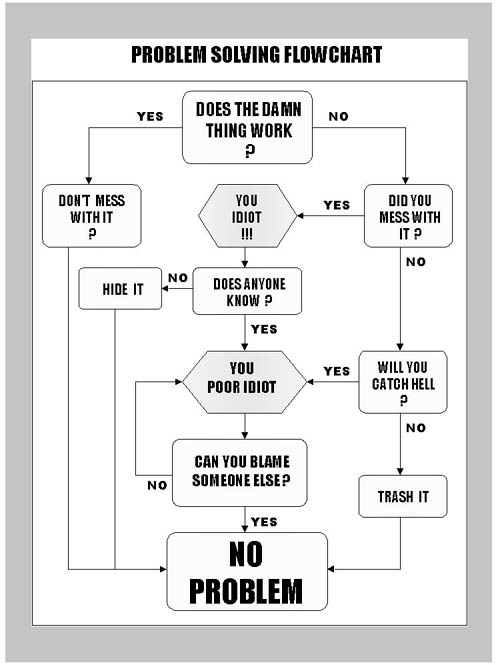
Is this funny? I think so; if you have any sense of humour, or are experienced in troubleshooting, you'll probably agree. That doesn't make it totally irrelevant. Sometimes, humour is based on truth.


Experience is a hard way to learn, but sometimes, it's the best way. If you need more insightful instruction, see Solving Network Problems - A Tutorial

If you make mistakes with your computer, you're using your computer. If you don't make mistakes, you have a computer.

>> Top

Don't Upgrade To Solve Active Problems

You see these questions in the forums occasionally:


  • I have a problem with my computers - I can't access each computer from the other. Since one computer was running Windows 98, I upgraded it to Windows XP. Now I still can't access both computers from each other. And the old computer runs really slowly. What do I do now?

  • I was having file sharing problems, on my Windows XP SP1 computer. Somebody suggested that I upgrade to Service Pack 2.


The advice, given frequently, starts with:
Did you back up your previous installation? If so, roll back there. First, fix the problems. Then plan the upgrade properly.

Prepare for your upgrade properly. Have a recovery process in mind, should the upgrade not go successfully. This means that you need to solve your current problems before you upgrade. Don't risk a triple whammy.

  1. Downtime caused by the upgrade.
  2. Downtime caused by recovering to the old operating system.
  3. Downtime caused by having to fix the original problems with the older operating system.

Fix issue #3 first. Then upgrade.

My Principles and General Advice

Let's see what I come up with here. Like this entire website, this article will start out small, and will probably grow. If you think this is less than useful, check back again later.

The Chair To Keyboard Interface

The Chair To Keyboard Interface, aka the CKI, is the most essential component in the setup and use of your computer system. A corrupt, or improperly tuned, CKI can cause disasters. Fortunately, a CKI fault (aka PEBCAK) will not cause deadly results, as you might get with a similar fault while driving your car, for instance.

Computer systems are designed to be fault tolerant, in this regard. That does not, however, mean that you should freely operate your computer while heavily under the influence of various factors:


Your computer security, in the end, depends upon you. All the security programs on your computer are challenged, and possibly useless, when you go surfing to websites which you know you don't belong on, or you go out in public, unaware of your surroundings.

Common sense = CKI Optimisation = Protection.

Links

These are links to websites of my friends, and some of my personal activities.


  • The American Red Cross wants to help you to be prepared for disasters.
  • Budowzone is information on how to keep your system running smooth, and to help with Windows security.
  • Chuck's Kitchen is a small, but growing, collection of my favourite recipes. If you come checkout my church, you may get to try one. I'm a Methodist, and Methodists love to cook.
  • Chuck's Miscellaneous Musings are Miscellaneous Thoughts About Local and World Events and Trends, from a techie viewpoint.
  • Crooked Spire is a Celtic music band, that performs in the Bay Area.
  • HowFunky is a place with useless technical content, from an MVP that lives in my area.
  • Jeffrey�s Ruminations is The Thoughts and Musings of Jeffrey Randow, another Networking MVP, about Networking.
  • Martinez Music Forum Gift to the Community was a joyful celebration of the Christmas season, including both secular and spiritual music, including both Crooked Spire and Martinez UMC Choirs. We'll have more during the year - so watch this space!
  • Martinez United Methodist Church is a small yet very active community church, in the East Bay suburbs of San Francisco CA. Drop by sometime, if you're in the area.
  • Mom's Trip To Russia is a pair of blogs - mine and Mom's - about my Mom's trip to Pytagorsk, Russia as a member of a VIM team.
  • MoonLake CyberSmiths WebHosting is a business part owned by a friend at DSLR Forums, and a possible future MVP.
  • Nitecruzr As A Hacker is a rambling tale of my college years, including one very memorable episode where I might have been expelled but for some fortunate circumstances.
  • Nitecruzr Miscellaneous Musings are miscellaneous musings from a techie perspective.
  • Pacific IT Pros, previously known as the San Francisco Networking Technologies Users Group, SFNTUG, is an independent non-profit organization for IT Professionals.
  • The Sounds Of Words is a revolutionary process for teaching reading, to students with special needs, developed by my sister.
  • Where's George? is an intriguing study into where that dollar bill in your pocket has been, and wondering where it will go next. It's free, and fun.


>> Top

Don't Lose Sight Of The Mission

This army officer didn't, but you have to read the whole letter.


Gentlemen,

Whilst marching from Portugal to a position which commands the approach to Madrid and the French forces, my officers have been diligently complying with your requests which have been sent by H.M. ship from London to Lisbon and thence by dispatch to our headquarters.

We have enumerated our saddles, bridles, tents and tent poles, and all manner of sundry items for which His Majesty's Government holds me accountable. I have dispatched reports on the character, wit, and spleen of every officer. Each item and every farthing has been accounted for, with two regrettable exceptions for which I beg your indulgence.

Unfortunately the sum of one shilling and ninepence remains unaccounted for in one infantry battalion's petty cash and there has been a hideous confusion as the the number of jars of raspberry jam issued to one cavalry regiment during a sandstorm in western Spain. This reprehensible carelessness may be related to the pressure of circumstance, since we are war with France, a fact which may come as a bit of a surprise to you gentlemen in Whitehall.

This brings me to my present purpose, which is to request elucidation of my instructions from His Majesty's Government so that I may better understand why I am dragging an army over these barren plains. I construe that perforce it must be one of two alternative duties, as given below. I shall pursue either one with the best of my ability, but I cannot do both:

  1. To train an army of uniformed British clerks in Spain for the benefit of the accountants and copy-boys in London or perchance:
  2. To see to it that the forces of Napoleon are driven out of Spain.

-- Duke of Wellington, to the British Foreign Office,
London, 1812

Interactive Problem Resolution and Thread Length

When I work on a networking problem in person, I can generally ask the owner / primary user of the computer a few questions. Based upon the answers received (or not), and having the computers involved in front of me, I can frequently do some investigative testing, and arrive at a diagnosis.

When I work on a problem remotely, the diagnosis generally takes longer. Then, I must ask the Original Poster (OP) to perform simple tasks for me. Generally, even then, with results from the investigative processes made available to me in real time (as the diagnosis is being performed), I can ask for additional investigative tasks; with enough patience and persistence (from both of us), a diagnosis is not impossible.

When I work on a problem asynchronously and remotely, as is the general case when advising in online forums, this problem becomes a bit more challenging. Latency becomes a factor, as does distractions from other helpers. The longer the investigative process takes, there is more chance that another helper will contribute an alternate diagnosis, which sometimes contradicts or interferes with the investigation at hand.


  • Factors affecting me.

    • Distractions by other tasks, including $payjob.
    • Ignorance of the situation being investigated (which generally decreases, as the investigation continues).
    • Ignorance of the subject involved (I try not to let this become a factor, by trying to focus on subjects which I have experience in).
    • Latency between posts. The longer I have to wait, after posting advice, for the OP to respond, the less I remember about the situation. This leads to longer time for me to respond to subsequent posts by the OP, leading, in turn, to decreased attention by the OP.

  • Factors affecting the second party - ie the owner of the computer, or the Original Poster (OP).

    • Distractions by other helpers.
    • Distractions by other tasks, including $payjob.
    • Ignorance of my methodical diagnostic procedures.
    • Ignorance of the situation being investigated (which generally decreases, as the investigation continues).
    • Ignorance of the subject involved.

  • Factors affecting any third parties - ie additional helpers.

    • Distractions by other tasks, including $payjob.
    • Ignorance of my methodical diagnostic procedures.
    • Ignorance of the situation being investigated.
    • Ignorance of the subject involved.


Are you a fan of American baseball? Have you ever watched American baseball? It's more than a bunch of guys hitting a ball around, and another bunch of guys trying to keep the first bunch from hitting the ball too much. There's a lot of strategy there.

Have you ever watched the Infield players (defense team) preventing an Infield Hit? The batter hits the ball to the shortstop (or other infield player, such as pitcher, second baseman, or third baseman), who grabs it, tosses it to the first baseman, and the batter is out. Simple - no strategy - just do the best you can to get the batter out.

Wrong. I was once on a corporate softball team, and the manager of the team arranged for an ex-pro baseball player (retired) to give us a small bit of strategic instruction. Just that small procedure - batter to shortstop to first base - is a quadratic equation carried out in real life. Watch sometime.

The shortstop and first baseman act as a single, coordinated unit, and maximise the time allowed them, before the batter gets to first base. How many times have you seen that the batter hits the ball, the shortstop fields it, and gets it to the first baseman when the batter is merely a third of the way to first base? Not that many times, I'd bet.

  • If the batter hits the ball really hard, the shortstop may have to really scramble to even stop the ball. When he gets up, he has to really hurry to get the ball to first base, where the batter is almost there.

    Since the shortstop is taking a while to get the ball to first base, and since he will possibly not be in exact control (he's scrambling, remember), the first baseman is covering first base at a stretch, with his toe on the bag, and moving in an arc around the bag, from the home plate side, to the outfield side. This gives the shortstop a 10 foot target to aim for (watch the first baseman stretch sometimes, he can get a good 5 feet stretch from his toe to his glove).

    As the shortstop throws the ball, in a hurry and from an uncomfortable position, the first baseman notes whether he is throwing straight towards first base, or to its infield or outfield side, and moves in the stretch arc accordingly. Shortstop throws ball, first baseman moves quickly to position himself, catches the ball, batter out.

  • OK, let's say the batter hits the ball really hard, and the shortstop is properly positioned, to grab the ball without even moving. His positioning, before the ball was hit, is not random; but we leave that for another discussion.

    The shortstop now has the ball in his hand, and he's standing and ready to throw the ball. Does he throw it to the first baseman immediately? No, because he's waiting for the first baseman to get into position. He'll probably toss it into his glove, and grab it again to get a really good grip for throwing.

    While the shortstop is positioning the ball for an accurate and hard throw, the first baseman is getting into position. The shortstop throws the ball like a bullet, right to the first baseman, and the batter is out.

  • Now for the third possibility. The batter hits the ball really weakly, so it just rolls. The shortstop charges towards the ball, and grabs it farther infield. He'll probably charge it to the right of its path, so when he gets it in his hand, he'll be facing the first baseman. Again, he's positioned just right, and in control.

    This time, he has less time to throw (he had to charge towards the ball, and the batter is running). Since he charged towards the ball, and at an advantageous angle, he comes up with the ball ready to throw immediately, maybe even from a bare handed grab. The first baseman, having already gotten into position, is waiting. The shortstop throws the ball, the first baseman catches it, and the batter is out.


So I know you're asking yourself "So what the heck does this have to do with network problem resolution?".

Well, I'm like the shortstop. Or maybe the first baseman, or a combination.

  • If the ball comes quickly (as in a problem report from the OP, with lots of good detail), I have a good chance of giving a quick snappy (mysterious) answer as to what to do about the problem.
  • If the ball comes slowly (as in the OP posts simply "My computers don't network"), I take my time, and ask a few questions, to try and get to know the OP, and the network. This looks like nothing useful to the other helpers. So the longer I take in my diagnostic procedure, the more chance that another helper may come up with alternate advice, or sometimes a quick fix. The alternate advice may, or may not, resolve the problem.

    1. If the alternate advice resolves the problem, it may be a solution that I did not anticipate. In that case, I have just learned something, and I may include it in one of my diagnosis and troubleshooting articles.
    2. If the alternate advice resolves the problem, it may be a solution that I did anticipate, and may have been mentioned in one of the many articles that I ask for the OP to Please Read. But the second helper, in a shotgun approach, or instinctively, may offer the solution without any diagnosis. Oh well, that happens.
    3. If the alternate advice does not resolve the problem, it may create complications that make it harder to fix the problem. So I have to watch carefully what the other helpers are suggesting, and if they come up with a procedure that may be a problem, I have to convince the OP to avoid that advice.
    4. If I come up with lots of advice, or articles to Please Read, the OP has lots to do. If I provide too much advice in the beginning, I may waste the OPs time, and his eyes may glaze over and he will ignore my advice. If I don't provide enough advice, the other helpers, again, may get involved.
    5. If I take my time, and ask just the right questions, I can lead the OP thru the problem diagnosis, and he / she can diagnose, and correct, the problem on her / his own, or from reading my articles, and maybe learn a bit from all the reading.

    Either way, getting the problem diagnosed and resolved is like getting the batter out. Sometimes it happens, other times it doesn't. And sometimes, the shortstop throws past the first baseman, and the batter ends up on second base, or farther.

    But out or safe, there is a strategy in there. You just have to know that it's there, and play with it.

Hoya

It was election time and a politician decided to go out to the local reservation and try to get the Native American vote. They were all assembled in the Council Hall to hear the speech. The politician had worked up to his finale, and the crowd was getting more and more excited. "I promise better education opportunities for Native Americans!"

The crowd went wild, shouting "hoya! hoya!" The politician was a bit puzzled by the native word, but was encouraged by their enthusiasm. "I promise gambling reforms to allow a Casino on the Reservation!"

"hoya! hoya!" cried the crowd, stomping their feet.

"I promise more social reforms and job opportunities for Native Americans!" The crowd reached a frenzied pitch shouting "hoya! hoya! hoya!"

After the speech, the Politician was touring the Reservation, and saw a tremendous herd of cattle. Since he was raised on a ranch, and knew a bit about cattle, he asked the Chief if he could get closer to take a look at the cattle.

"Sure," the Chief said, "but be careful not to step in the hoya."

Congratulations

You found what you need. Help Me To Help You.

If You Ever Feel Like Experimenting


  1. Setup 2 computers, a client and a server. Use NBT and TCP/IP, initially, on both.
  2. Get file sharing working (opening files from the client) using NBT only, no NetBEUI.
  3. Install Zone Alarm on the server, and configure it so the client can access shared files on the server, and can ping the server.
  4. Engage the ZA lock, so the client can NOT access files on the server, nor ping the server.
  5. Unbind File Sharing from NBT on the server, and install NetBEUI. Leave TCP/IP working, but NBT disabled.
  6. See if the client can ping the server.
  7. See if the client can access files on the server.
  8. Disengage the ZA lock on the server.
  9. See if the client can ping the server.
  10. Change the ip address of the server to a different subnet.
  11. See if the client can ping the server.
  12. See if the client can access files on the server.

How To Get The Most Out Of PChuck's Network

Welcome to PChuck's Network! Pchuck's Network is a Blog, and it's written in Hypertext. Note my general principles, that I state repeatedly in my various articles.

Please observe Legal Discretion when referencing articles posted here.

Please note my Privacy Statement, when you ask for advice in an open forum. There are several ways to contact me - in an online forum, by email, or thru my Guestbook. Most urgent help can be gotten by the first of the three.

Contacting Me
If your message contains a question about a network issue, I strongly suggest that you post a problem report in an open forum, where helpers like me can be found. There are two forums where I normally spend my time ("too much time", some would say):


Using online forums for help requests is a good idea, for several reasons.
  • You'll get better help with all the helpers able to see, together, the status of your problem, as it's resolved.
  • Many helpers keep their email addresses secret, and won't be interested in sharing them with strangers.
  • You encourage a spirit of community, which is what drives these forums in the first place.
  • You help provide an online record of problems and solutions, again strengthening the idea of using online forums for problem resolution.


If you're uncomfortable asking for help in an open forum, I'll ask that you read a some of my articles, to start:

If you feel the need to message me, whether to tell me how great PChuck's Network is (or to tell me what needs improvement, I can take it), or to ask for assistance (my resources and time permitting), Please Sign My Guestbook. If you provide an email address, only I will see it, and I will be able to write to you. And if you wish to leave additional, confidential details, you can make your entire message Private.

Until I start getting a lot more hits in my GuestBook, though, I'll probably not check it as often as the open forums. Also, my GuestBook doesn't integrate well with email, so I can't guarantee a quick (or immediately helpful) reply. So start with one of the above forums, if you require immediate assistance. Send me a private message, in my GuestBook, if you need special help, and are prepared to wait a while.

A Blog
A Blog is a work in progress. What you see here today may be rewritten, with more detail, tomorrow.

That being the case, you should not plan to get all the information in one visit. Read, what you have time to today, and plan to return here soon, and regularly. But when you return, how will you know what articles have been rewritten? I spend a lot of time rewriting existing articles, as well as writing new ones. Like this article.

As I write, and rewrite articles, I link the various articles to each other, and to other websites. I don't spend any time identifying each new article, or each updated article, in a list that you can examine. Any list would be only as useful as it is customised to fit the needs of each reader, and since each person is unique, this would be an impossible task.

If you would like to create and maintain a list of your own, so you can keep up with changes here, you can get a Newsfeed Reader. This will let you keep up with this website, and any others that interest you, without you having to tediously surf to each website, to look for changes.

The Newsfeed Reader, in combination with the newsfeed attached to the website, will tell you, at your convenience, when an article on PChuck is changed, and let you view the article. There are two conventions for newsfeeds - Atom, and RSS.

Right now, PChuck has an Atom feed, so you will need a Newsfeed Reader that is Atom compatible. If you have Firefox (and I hope that you do), you may get Sage, a free lightweight RSS and ATOM feed aggregator, as a Firefox extension. You could also get a standalone Newsfeed Reader. There are a dozen or so listed at AtomEnabled.

Hypertext
A Hypertext document is a document with many pages, and the various pages linked to each other. It uses the same structure as the web, except that all of the pages are part of the same website, and have the same style.

When you read a book, and you see a reference to another page in the book, you have to interrupt what you're reading, find the other page, read there, then find your way back. When you read Hypertext, you simply read what's there, and hit the Back button in your browser. You have to be able to recognise the links.

The links are there to simplify the reading process. If you're just looking for an overview, you can simply read each page.

Have I lost you? Click on one, and see what you get. Please. You'll be helping both of us.

Legal Permissions
PChuck's Network is subject to change at any moment. You, and your friends, will benefit the most by directly linking to the articles here. Permission is expressly granted for you to extract relevant contents of any article in PChuck's Network, and post the extracted material elsewhere on the web, or include it in email, if, and ONLY if, you include a working link, to the article from which you are extracting, in your extract. This is for your own good. The web, and this web site, is dynamic, so please use it that way.

You may, if you wish, extract relevant portions of articles, for inclusion in any paper documents. I strongly suggest that you include a link to the original article, and date of copying, if at all possible. Again, this is for your own good.

>> Top

Welcome to PChuck's Network

Microsoft Windows is an incredibly complex operating system. Making an installation of computers running Windows work, at all, is a challenge. Making one work properly is even more of a challenge. Fortunately, thanks to the Internet, the problems which you may be observing today may have already been discussed, and resolved, by other folks before you. And there are many websites to give you advice, based upon those experiences.

Now, many websites offer you learned advice on various subjects; some on Windows Networking, as PChuck's Network does. Many websites are procedure oriented. If you know what to do, they will give you details showing you how you can use a particular wizard. But - if you don't know what to do, or how to solve a given problem, how are you going to find a solution? That's like using a dictionary - some folks think that you can learn how to spell a word, by looking it up in a dictionary.

PChuck's is organised by goal. For problem solving, it's organised by symptom. Now, it's not finished - few websites are ever actually finished. But give it a shot - it may have an answer or two for you.

If this is your first visit here, you may wish to start with the introduction, How To Get The Most Out Of PChuck's Network.

Having reviewed the site introduction, you may find that there are several ways to benefit from the material here.


And check out my Links page, for extra interests of mine.

More articles are added frequently, and existing articles are revised even more frequently. Check here regularly, using a newsfeed reader for best results. And tell your friends about PChuck's Network!

>> Top

Common Problems and Resolutions

"Error = 5" aka "Access Denied"
"Error = 53" aka "Name Not Found"
Intermittent Connectivity Problems When Computer Is Idle
Intermittent Server Visibility Caused By The Restrictanonymous Setting
Intermittent WiFi Connectivity Problems Caused By WiFi Client Manager Conflicts
Internet Access Problems Caused By DNS Problems
Internet Connectivity Problems Caused By A Corrupt Or Hijacked Hosts File
Internet Connectivity Problems Caused By The MTU Setting
Irregularities In Access To Individual Shares On A Single Server
Irregularities In Access To Network Neighborhood (Workgroup)
Network Access Affected By Limited Or No Connectivity
Network Access Affected By LSP / Winsock / TCP/IP Corruption
Network Access Affected By NetBIOS Over TCP/IP Being Inconsistently Set
Network Access Affected By Physical Networking Issues
New Network Connections Wizard Functionality Damaged By System Restore
Server Access Affected By IRPStackSize
Server Access Affected By User Not Granted Requested Logon Type
Server Access Affected By Maximum Simultaneous Connections
Server Visibility Affected By The Invisibility Setting
Server Access And Visibility Affected By Personal Firewalls
Server Access and Visibility Affected By Less Known Registry Settings
Well Known, Yet Mysterious, Errors May Have Simple Resolutions


>> Top

Tutorials

Asking For Help For Internet Connectivity Problems
Asking For Help For Network Neighborhood Problems
Diagnosing Intermittent Connectivity Problems
Hacking Defined
Finding Computers On Your Network
Layered Security
Malware (Adware / Spyware)
Networking A Windows Vista Computer
Networking Your Computers
The NT Browser and Windows Networking
Restrict Your Privileges
Solving Network Problems
Troubleshooting Internet Connectivity
Troubleshooting Network Neighborhood (Windows Networking)
Watching What Your Computer Is Doing
WiFi Environment Analysis
WiFi Networking
WiFi Security
Windows Networking - Elementary
Windows Networking - Advanced
Windows XP And Vista File Sharing


>> Top

Diagnostic Procedures and Tools

Autoruns
Browstat
CDiag
CPSServ (NOTE: Requires download of PSTools) (free).
Command Windows
Event Viewer
Finding, and Tracking, Computers On Your Network
HijackThis
IPConfig
Local Security Policy Editor
My Personal Toolbox
Net Config
NetCheck (NOTE: Requires download of PSTools) (free).
Network Connection Wizard
Network Stumbler
Network Setup Wizard
NTRights
Ping
PingPlotter
Registry Editor
Services Wizard
Static Route Table
System Restore
Windows Explorer
WindowsUpdate Log Interpretation


>> Top

Using The Internet Properly

Bottom Post, Please
Download Software Selectively
Help Us To Help You
Getting Help On Usenet - And Believing What You're Told
How To Contact Me
How To Post On Usenet And Encourage Intelligent Answers
Interactive Problem Solving
Please Don't Hijack Threads
Please Don't Spread Viruses
Provide Diagnostic Data As Text, No Attachments or Images
Provide Essential Details When Asking For Help
Please Use BCC:


>> Top

Networking / Security

Ad-Aware or Spybot S&D? You Decide
Beware Of Hidden Physical Personal Firewalls
Components Definition - Networking
Design Your Network Properly
Have Laptop Will Travel?
Computer Uniqueness and Security Needs
ICS Is Not The Only Possible Solution
Make Your Wireless Computer Connect Only To Your Network
NAT Router - What Is It?
NAT Routers With UPnP - Security Risk, or Benefit?
Online System Virus Scanning Services
Pop-Ups - How To Deal With Them
Protect Yourself - Restrict Your Privileges
Protect Yourself When Using A Public Computer
Protect Yourself When Using A Public WiFi LAN
Protect Your Hardware - Use A UPS
Quick Networking With A CrossOver Cable
Setting Up Two Routers On The Same LAN
Sharing Dial-up Internet Service With A Router
Spam Spam Spam - Spam Spam Glorious Spam: Early Spam, and Modern Spam.
SSID Broadcasts
WEP Just Isn't Enough Protection Anymore
WiFi Will Never Be As Fast As Ethernet


>> Top

Windows Networking / File Sharing

Address Resolution On The LAN
Browsing and Multiple Subnets
Domain vs Workgroup? Plan Properly
Cleanup Your Protocol Stack
Components Definition - Windows Networking
Local Name and Address Resolution On Your Computer
One Use For IPX/SPX
Setting Up File Sharing Properly
Windows 9x (95/98/ME) and the Browser
Windows NT (NT/2000/XP/2003/2006) and the Browser
Windows Vista / XP / 2000 On A Domain


>> Top

PChuck's Network NewsFeeds

This blog is PChuck's Network. This post is PChuck's Network NewsFeeds, and you are looking at the blog itself. What you see is a lot easier for you to read, than for computers to do so. There's another copy of your blog, that's designed for computers to read.

The other copy is called the blog (site) feed. The site feed is read by a newsfeed reader. If you would like to be informed, automatically, when this site (or any of millions of other sites on the Internet) is updated with new and interesting articles, you get a newsfeed reader, and subscribe to one or more feeds.

You have several choices, for newsfeed readers. Here are a few examples.


You have several feed choices, for PChuck's Network. You can take any of these feed URLs, and subscribe using any of the above (or numerous other) newsfeed readers.
AtomRSS
CommentsBlog Comments - AtomBlog Comments - RSS
PostsBlog Posts - AtomBlog Posts - RSS


Please note that the above 4 feeds are just suggestions of what you may subscribe to, to get the most out of my blog.

Privacy Statement

You are reading this statement because you are asking for help with a networking problem. You read about this website in a serious help forum - this website is only advertised in forums where serious help is given. You have to trust us, and to Help Us To Help You.


  1. Nobody helping you here has any intent of deceiving you, or of compromising the integrity or safety of your network, in any way.
  2. No information provided initially, in browstat or ipconfig, is of use to anybody with dishonourable intent, in compromising the integrity or safety of your network.
  3. If you are asked to provide any additional information, that request will be made only as necessary to diagnose your problem.
  4. If you do provide any information which could possibly compromise the integrity or safety of your network, you will be advised how to mitigate the risk.


>> Top

Please Don't Spread Viruses

The Internet is a wonderful communications tool. You can provide advice, instruction, sympathy, and so many other services to folks so easily. Unfortunately, just as you can spread good things to others, some have found you can spread bad things too.

Viruses are one thing that you can spread, that you shouldn't. OK, you're thinking, I have X AntiVirus (no I'm not naming products here), so why is he haranguing me on this subject? I don't spread viruses.

But there are viruses and there are viruses. If you get an email from a friend (even an email intentionally sent), and the email instructs you to forward it to 5 (or 7) (or 10) of your friends, it's a virus. It's not as harmful as the Format C: virus (which is in itself a myth), but it can be as annoying.

If you're religious, a religious blessing is a benevolent virus, and if you carefully choose those to receive the blessing from you, a not unpleasant one. You have my blessing in forwarding those, but please forward them properly. Other email viruses are not benevolent ones - please don't forward commercial or financial ones.

Any time you get an email telling you how you can get money from perfect strangers, such as officers of large corporations, and instructing you to forward the email to your friends, chances are that it's a hoax, and a virus.

Any time you get ANYTHING in email that sounds too good to be true, it probably is. Do yourself (and your friends) a favour, and check it out. There are several on-line databases listing known hoaxes and viruses that spread thru email. Spend a few minutes, and search these databases, before spreading the next email virus.

Note, this list, like most of my lists, is alphabetised. Please don't ever take relative list position, as any evidence of my personal recommendation of any one item over another.


None of the above databases totally duplicate any other, so anytime you have doubts, check several before deciding that any suspicious email is, or isn't, a virus.

Also, some of the databases are run by large corporations, and while harmful intent is unlikely to be any motivation in any database that I will ever recommend (here or any other article), some corporations may or may not provide the full truth. Always check more than one database for any question.

Finally, the databases that aren't run by large corporations are non-profit, and do accept donations. They are, IMHO, valid and worthy causes. If it's in your spirit (and your pocketbook), you could do worse.

So, the next time you get an email, from a friend, that's come from another friend of that friend, check it out. If it's listed, do everybody a favour and let your friend know about hoax verification. If you wish, you may even send a link to this web page. I wouldn't mind, and you'd be doing good for a lot of people. Just click on the little envelope at the bottom left, above "Home".

Please Use BCC:

One wise guy on the web says something like


If someone sends you an email and asks you to forward it to 10 of your friends, please forget that I'm your friend.

Email is a great communications tool. IMHO, it's the most important invention since the printing press, and far more important than the typewriter. You can reach thousands of people just a few seconds of work. Unfortunately, you can also irritate thousands of people with just a few seconds of work.

I love to get email when it's personal - most of us do. I don't mind if it's irrelevant or frivolous, as long as it was sent for personal reasons, or with me in mind. But I hate unsolicited commercial email, and I hate email of any type which has my email address in a long list of recipients, if it's not a corporate distribution.

I love, considerably less, getting email addressed to me and a bunch of strangers. Why? Because with any email going to a dozen or so strangers, chances are that somebody in the group, or somebody that may get the email forwarded onto them, will have an infected computer.

When you get an email with you, and a dozen strangers, addressed, those strangers are getting the same email. Some email client programs will automatically, or with a single mouse stroke, add all names and addresses in an email into their address book. Quite likely, folks who use such an email client, and routinely add strangers to their address book, are the same ones who don't practice layered security, and are most likely to have an infected computer.

Many viruses spread from computer to computer, getting targets from each computer. If your email address ends up on an infected computer, you will be soon start getting email containing the virus. Not just once, but once / day (if you're lucky).

Please, if you're going to forward email to me and a dozen other strangers, use a Blind Carbon Copy (BCC:) distribution list. With a BCC: list, none of the recipients see each others address. This means that, upon hitting an infected computer, the email will contain nothing to send the infection to me - or to the other dozen or so recipients of the email - just back to the sender.

When you send an email, the recipient will see your email address as the sender. Depending upon your email program, if you use BCC, you may have to put something in the To: or CC: fields. With Google Mail (GMail), you don't have to supply a To: address; with others, you may. Put your own address in To:, if you have to. If that's a problem, because of the viral risk, just be careful who you email frivolously. You should be careful, anyway. Or paranoid, as I am.

And one more thing - if you truly feel the need to forward email to me and 9 other of your friends, besides using BCC, please Clean Up the Content. A clean message travels better, and is easier to read.

  • Clean up the Subject line. Don't send a message "RE: FWD: RE: My Thoughts Of You", send it as "My Thoughts Of You".
  • Clean up the Body. Don't forward the name of the person who sent it to you, or any of the other header content (such as the dozen other recipients, if your friend isn't using BCC), or any of the trailer that's always tacked onto email by every email program. Just forward the message.
  • Re paragraph the content even. Have you ever gotten email like:

    "Hello, is this here the sheriff's office?"
    >
    > "Yes. What can I do for you?"
    >
    > "I'm callin' to report my neighbor, Virgil Smith. He's drillin'
    holes in his
    > farwood and hiding marijuana inside!"
    >
    > "Thank you very much for the call, sir."
    >
    > The next day, the sheriff & his deputies descend on Virgil's
    house. They
    > search the shed where the firewood is kept. Using axes, they
    split every piece
    > of wood, but find no marijuana. They sneer at Virgil and
    leave.
    >
    > The phone rings at Virgil's house. "Hey, Virgil! This here is
    Floyd. Did the
    > sheriff come?"
    >
    > "Yeah!"
    >
    > "Did they split yer farwood?"
    >
    > "Yep!"
    >
    > "Happy Birthday, buddy!"

    Wouldn't this be so much easier to read as:

    "Hello, is this here the sheriff's office?"

    "Yes. What can I do for you?"

    "I'm callin' to report my neighbor, Virgil Smith. He's drillin' holes in his farwood and hiding marijuana inside!"

    "Thank you very much for the call, sir."

    The next day, the sheriff & his deputies descend on Virgil's house. They search the shed where the firewood is kept. Using axes, they split every piece of wood, but find no marijuana. They sneer at Virgil and leave.

    The phone rings at Virgil's house. "Hey, Virgil! This here is Floyd. Did the sheriff come?"

    "Yeah!"

    "Did they split yer farwood?"

    "Yep!"

    "Happy Birthday, buddy!"

    If it's worth forwarding, it's worth cleaning up the paragraphing. Really.

Getting Help On Usenet - And Believing What You're Told

Usenet, and other online forums, will always be the best place on the Internet for free help. The true geeks hang out in the forums there, because Usenet (or its predecessors, the dialup bulletin boards) has been around before the Web, when a forum was a computer with one or more modems, and posting to a forum meant dialing up to that computer. If you have a Usenet Reader, don't just use web based forums, and you've been around for a while, you may know what I mean.

The best - and the worst - thing about Usenet is the anonymity. You can be who ever you wish to be, and nobody can tell the difference. Anonymity on Usenet is a blessing, and a curse. If you need advice, how do you know who to trust?

Common sense is a good way to start.


  • Look for a forum where the posts contain serious, well stated questions, and serious, well stated answers.
  • Look for a forum where people seem to use first and last names, or first names anyway, and where people seem to recognise and respect each other.
  • Avoid forums where people post in "leet speak", or use mysterious names.
  • Avoid forums where half the posts consist of arguments, or flame wars.


Here, Google is your friend. Google has all Usenet forums, archived for some time previous. When you find a forum where you feel comfortable, and find persons who seem to be useful, spend some time reading older posts.

Peer review is a benefit of Usenet. The helpers in a forum where serious help is provided will not tolerate bad technical advice. Anybody speaking from lack of knowledge will be quickly corrected. Look for helpers who provide careful, well stated advice, and who don't get corrected a lot. Or look for helpers who make mistakes, accept and acknowlege their mistakes, and fix their mistakes. Remember that many helpers are learning too.

Remember, anybody can post on Usenet, and can use any name that they like. Be careful when you accept advice - if you find what looks like good advice, spend some time reading previous posts by that advisor, and make sure the content and style of all articles is consistent. Make sure that the advice you're accepting is from someone who has been providing advice for a while, and not by an imposter or imitator - in serious help forums, anybody giving bogus or misleading advice won't be tolerated for long.

In short, don't be mislead by trolls.

And, when you ask for help, try and fit in. If you respect and trust the helpers, it's likely that they will respect and help you.

Help Us To Help You.

  • Trust us.
  • Provide relevant background information about your problem.
  • Don't edit or munge the diagnostic data requested. Since you don't know what the problem is (if you do, why are you looking for help?), you don't know what detail might be relevant to its diagnosis.

In Need Of Spiritual Nourishment?

I don't push religion on anybody, but if you're in the neighborhood, and feel the need, please Come Join Us. Free coffee on Sundays.

>> Top